Saturday, August 1, 2026

Why the Fediverse works, but Peertube doesn't - An opinion

Let me state this right up front, I am in no way associated with anyone that works for Mastondon, or any of the instances.  And I'm in no way associated with any one working on the larger fediverse.  The opinions are my own. And only influenced by my usage of a handful of instances and servers.  Also I've not tried every type of service offered. (IE: Pixelfed, Lemmy).  This will focus mostly on Mastodon, and Peertube. I also use Bookwyrm which is part of the fediverse, but I have nothing to compare it too, so I'll not talk about it here.

My social media needs changed over time.

Early in social media history there was Myspace, Facebook, and Twitter.  And I had accounts on all three at one time or another.  Myspace, I never used it. I can't remember a thing about it. It was a blip in the history books, a blink and you'll miss it kind of thing. Facebook - I only ever really had Facebook because that is were the kids shared pictures of the grand kids.  Up until this year I had never posted on it, and it very rare that I ever go to Facebook for anything (Other then grand kid pics.).  When we owned a business we did have a Facebook page and that helped to drive some people to our business. But that is a bit different then using the platform to meet and interact with other people.  Facebook has it's place, but it's low priority for me.  Twitter, I joined twitter early, perhaps 6 to 8 months after they first launched.  This was my go to social network, and a true life saver in 2020. I spent a lot of time on twitter. And had a lot of interaction with people, bots, and whatever.  The site really started to take a turn thou sometime mid 2020, and I started to see a lot of toxic posts. And I was already considering leaving the platform (Sometimes you just know when you are no long welcome.) I stuck with it mainly because of some of the people I did meet and get to know a bit. Most of the real people where generally nice people.  Then it happened Elon Musk took over in 2022, and that was the time I left. It was during these times of change I was reminded of Mastodon.  Bluesky and Threads were also working on starting up. I've not been back on Twitter since I left in 2022 shortly after Musk took over.  I did try Bluesky, after finally getting an invite. I didn't really like it, but that was early - they were still working out things. It might have improved, it might not. It wasn't for me. I had already joined Mastodon Radio, having forgot that I had a Mastodon Social account that I had setup (and never used) in 2018. Threads owned by Facebook, and I just don't like Facebook enough to care about doing anything with them.  SO Mastodon it is,  I noticed that my posting habits changed about this time as well, while using Mastodon Radio I found that I watched more then I posted.   I still had interactions with people, and they were good, even funny. I noticed the owner/moderator of Mastodon Radio really put a stop to toxic posts, even blocking entire instances if they became a problem.  I even found some of my friends from Twitter had also moved to Mastodon. It was quite a different experience.  But that was one instance, what about others?

That is what makes the Fediverse work, It is not just one social network. It is many independent networks, all talking together. Other services (Pixelfed, Lemmy, Bookwyrm, Peertube) can all interact with each other. This works to various degrees, and you can move across instances fairly seamlessly.  In otherwords if an instance will shut down, there is away to move all your followers, and who you follow plus posts, and timeline to another instance.  You can even do this to a limited degree between some of the services. This is something that centralized  networks just can't do. And one of the main reasons why the Fediverse works so well.  

Find an instance you like, stay with it?  Find an instance and you want a change (for whatever reason) and you can move.  Want to start your own private instance?  No problem, move everything to that private instance!  Want to block a toxic domain, easy.  

Mastodon, also gives end users a easy way to setup filters, don't want to see posts about a "topic" filter it.  This works, but kind of assumes that everyone will use hashtags, or post the same type of topic. You can start adding posts that don't follow the use hashtags guideline. But that takes a little extra work.  

There are filters for just about everything thou, so if you on a user level don't want to see posts from an instance I think there is away to filter thou. 

Mastodon really is a mature network, with lots of tools behind the scenes that just make things work. You as the user don't need to think about them. (You as a owner/moderator that is a bit different, and you do need to know some of them.)  

So now I really don't post much, I play some games (wordle, and the like) and post the results. And I interact with others who also play the games.  But my posting habits have really changed. 

But if you would like to follow me I can't image it would hurt!! LOL. @kd8bxp@mastodon.social

Why Peertube fails (An opinion). 

So a couple of years ago I left YouTube, mainly because of what I perceived as corporate greed at the time they changed how monetization worked, and honestly (in my opinion) made it very hard for a small channel to make anything. The thing is over the lifetime of my channel I only made roughly 600 dollars, money wasn't really why I was posting videos. It was completely the fact that they changed how it worked. Meaning even if I cared about making anything I probably couldn't. 

 I was already on Mastodon, and was aware of Peertube, so I thought, I really like how Mastodon works, I'll give peertube a try.  But over the two year span, I believe I have been on three different peertube instances, two of them failed for the same reason, the third is trying a subscription based model (after been free/donate for quite sometime as I understand it).  I am pretty new to the last instance, it's a large instance and I would have (and did) make the assumption that being a large instance they could handle the influx of videos.

I don't want to name names here, because I know these networks are small when you compare them to something like youtube. But that is part of the problem, they are small.  

Video takes up a lot of storage space, and the more users you have, the more space you need, the more space you need the more it costs.  And everything in the world of computers is becoming more and more expensive.  I get that, I get that you can ask for donations, and not get them, and someone still needs to pay the bills. Which is exactly what happened with the two small instances I was original on. They simply ran out money, and the donations were not enough to cover the costs. It is said but a true reality of the situation.

The third and finally peertube instance I'm on is moving from a donation base to a subscription base with a free tier level of only 2gb. This is probably a good choice for them, they clearly were not able to pay the bills with just a donation model. And I wish them luck in the future. As for me, I have 2.1gb being used right now. It's not clear to me if a video will need to be deleted to recover that .1gb or if I'll be fine and just not able to upload anything until I remove something.

While the larger Fediverse is ad free, being ad free for a Peertube instant just doesn't work.  Peertube needs ads. And remember it was ads that caused me to leave YouTube, so this statement coming from me may seem counter active. But hear me out.  They don't need to be aggressive like YouTube, maybe an ad every 3 videos, but they do need them. They need something to help off set the costs of running a system that depends on a lot of data being stored.  The larger the instance the more they need ads. It's just a cold fact. 

They also need the donations, they can't just depend on ads to pay the bills, they need people who are willing to say, yes - you have some ads - but you are still better then YouTube or another centralized video host.  

Going to a subscription model, may work. It doesn't really work for me. I'm a small fish in a sea of large fish, I don't post video enough to pay for monthly storage. I'm not even mad they did it, in fact I understand the costs.  But I am left with very few choices, it seems a couple of years ago I had some similar choices. And two of the largest of those choices are still alive and well. Both depend heavy on an AD stream.  I could move to yet another Peertube instance, but I fear in the end any Peertube instance that lets users join will run out of money sooner rather then later. Leaving me to choice to go back to Youtube (with a slightly different perspective, and definitely a better understanding of storage.)  My other choice was and is Rumble. Rumble is kind of interesting, where you can get monetized from day one, but (my videos) may not been seen because the algorithm seems to favor politically and commentary videos over maker style videos.  My other choice is to spin up my own (on my own hardware I already own) Peertube instance. This will cost some money up front, but is something that I can completely control. And make so only I or my family post videos. 

The issue with Peertube and the larger Fediverse - peertube (at least from what I've seen) seems to work a bit differently - An instance doesn't get automatically discovered, your instance has to follow other instances for the videos to show up (at least that is my understanding) They also don't show up in the Mastodon time line unless you or someone follows the channel content, not the owner of the channel. (?) But once they are in your timeline you can boost them, and people can favorite and reply and that shows up in the peertube instance.  At least that is how I understand it too work. So creating your own small instance might not be the best way to have your videos found (?)  Also your ISP may not be happy that you are hosting a "server" on your network. In fact they might get down right grumpy about you hosting a server.

In conclusion.

  While the wider Fediverse gets a lot of things right, Peertube just is not one of them. 


This has been an opinion from LeRoy Miller, KD8BXP or follow me @kd8bxp@mastodon.social

Monday, March 9, 2026

What does it mean to ME to be a Star Trek fan - an opinion.

 First this is something I've been thinking about for a while. I first started thinking about this maybe 5 or 6 years ago. At the time I was watching some youtube video reviews for Star Trek TOS, a show I grew up with. I enjoyed watching them, until one day I watched a rant about how certain people can't be and were never real fans. And that Star Trek was never meant for us. That same video said that I shouldn't be watching any of the creators content, because it was not meant for me. It was completely motivated by a political agenda.  

But it did getting me thinking, What is it about Star Trek that I do like?  

(as a side note: politics is the easiest way to kill a friendship. And I try in my daily life to not talk politics, either in real life or on-line. I'm human, and sometimes I fail, but I try.)

This is my opinion, your opinion maybe different and that's ok. As long your difference don't result in name calling, and just being a jerk.

I've been further motivated to think about this recently after again being told that Star Trek was never meant for me. 

So here is the deal, Star Trek at least classic Trek TOS, TNG, Voyager, DS9, Enterprise were meant for everyone. Everyone could find something they liked about any of these shows. They could also find plenty they didn't like about some of these shows. And at times they all could agree an episode was just plan bad.

I'm looking at you "Code of Honor" and "Angel One" from TNG,  And plenty from my personal favorite series TOS - I'm looking at you "Turnabout Intruder", but there are a few to choose from, and not everyone agrees.

Now as I said TOS is my personal favorite series. It was in syndication when I was young, it was something that I could watch almost every day after school.  And I can remember wanting to see what adventures the crew got into.  With the exception of a few episodes it didn't matter which order you watch them in. You always got the feeling that Kirk, Spock and McCoy had been working together for a long time. Even the secondary characters of Scott, Uhura, Sulu, and later Chekov you knew who these people where, they all had back stories, they had all been together for a while.  In my head canon Chekov had been on the ship for a while, and finally got prompted to the bridge. 

The stories were for the most part written so they didn't talk down to the audience. 

There really wasn't a villian, not the way we currently think of villian anyway. There were a number of antagonists. Every antagonist was written smartly, they all had motivations as to way they were the way they were.  It was never clear who was right or wrong, generally speaking there was a lot of gray. 

The Romulan's were not written to just be evil people who hate The Federation. They had lives, they had families, they had jobs and they had character.  

Same with The Klingon, these people were not evil, they were doing a job. They had lives, they had families, they had character. 

In some episodes you even feel sorry for the antagonist, Charlie X, The Horta, Mudd. 

It's the rich act of making the main antagonist relatable, and in a short period of screen time conveying a history - The stories for the most part were well written. And in some cases re-written many times so they could get it just right. Or as right as you can in 45 mins.

But does this explain why I am a fan?  No not really, I mean good story telling is part of it.

Is it the ships? Maybe, but probably not the ships that most would think.

I was a big fan of the Romulan war bird - that ship is in my top ten list of best ships.  Don't get me wrong The Enterprise is on the list. But I've always been a fan of the smaller ships. The DY-100 was by far my favorite Earth ship. When the Miranda class first showed up on screen, that quickly became one of my favorites.  I really like the smaller ships.

So is it the ships that make me a fan, maybe? Not really, yes, I like them. But honestly in TOS we really only get a handful of ships to look at. TOS mostly focuses on The Enterprise and other Constitution class ships. Yes, you have Romulan War Birds, and Klingon D7s both of which are just as iconic as The Enterprise.

Is it the side characters?  Perhaps one of the best known Harcourt Fenton Mudd, also probably the one that has had the most stories outside of the main cast. (Someone fact check me on that - but it seems that way).  He is someone that has had a large history created for him. Someone that operates on just this side of the law. Sometimes described as a con-man, or smuggler, but there is more to the man.  

Yes, I think when I saw Mudd I realized you don't need to be in Star Fleet to have adventures.  Here the universe got much bigger. You can be part of The Federation, but still independent. You can still work for yourself, there are still rules you need to (or should) follow. But if you want to be a trader, an entrepreneur you can be.

I mentioned the Horta earlier, here is a mother figure who only does what it needs to do to protect the babies. In a short amount of time you get a picture of just how much responsibility she has. And just what it is will to do in the name of that responsibility.  She is tasked with protecting an entire race. We get a near complete idea of what this creature is, what motivates it, and what it is will to do. We get a idea that it doesn't like the idea of killing, but it has to. 

 And many many other side characters, really too many to name them all. But most have some kind of history behind them - not all of them, and a few were poorly written for sure. But most you get a since of who they are, what motivates them, and maybe even why.

I'm not including Klingons or Romulans as side characters, because lets face it there was a lot written about both.  

So was it the side characters? Maybe, I mean most were interesting, and most left an impression.

Well what about the adjacent empires? Klingons, and Romulans - yes, here we have a few different stories about each, we get more of an idea of who these people are, and that they aren't "evil".  Each when on to have rich, rich stories. Each had motivations, and characters that were both memorable and have history. 

The Romulan showed what I believed was the first female commander in charge of a ship. At a time when The Federation doesn't yet have female captains.  And she is a well written, driven, intelligent. 

So here is where we can say The Federation is behind, even the Romulans have female commanders. 

But was it the adjacent empires? No not really, I am happy to get to know them, but no it's not really way I'm a fan. 

What about economics?  Economics in TOS seams to me to be complicated.  We see miners who are described as being rich, and we see  no need for money. Yet many times Kirk has to spend something to get something. Credits are a form of currency.  TOS is almost a post-scarcity society, I say almost because at times it's clear that Kirk needs something, that can only be found somewhere.  Food was abundant, but people still worked hard and someone payed for items.  This seems like The Federation need to hire contractors to mine, the contractors work not for personal betterment, but for monetary gain. What will this money get them? That's unclear.  There are a few episodes that talk about buying planets! Buying involves money of some type.  Now I believe money was becoming less a motivation at least in the federation, but it was still something that everyone knew about. 

I would make the argument that even in TNG money is known, it's not the driving factor - but some races still use money, so there is a capitalist system that is known.

I would say in every version of Star Trek economics are complicated. 

I would also think that Star Trek really isn't a Utopia - but it's not the same system we currently have either. Money is still a thing, but it's used rarely.  It's actually used quite a bit in TOS, but later it seems to be used less and less.

Is it because they explore the galaxy? I think there is a lot to this, and I would give this a big yes. I really like watching the ship go somewhere, and the crew learn something.

SO after thinking about this for quite some time - I just think it's ALL these things that make me a fan. At least a fan of TOS, TNG, and Voyager.  

Now here is something that is going to surprise. I've only seen a handful of DS9 - what I've seen I've liked. But I can say I'm a fan of DS9 - I completely know it is the favorite of a lot of people. But I just can't seem to get into that show. 

Maybe it's because it has a story arc? maybe because it's set on a station? (It's probably because of the station! I can't get into Babylon 5 either - and I know it's because it's on a station.) See I like ships, and while DS9 did add the Defiant - IMHO it was too late for me.  Thou I will say the few episodes I've seen have all be set on the Defiant going some where.  So yeah it's the station.

I'm mixed about Enterprise, I really wasn't a big fan of it being a prequel. But the stories were mostly good, and the characters were all well written.  It's not my favorite, but it's not unwatchable either.  It has good moments, and it has bad moments just like the other series.  But if I had a choice of what to watch, it wouldn't be in my top choice.

There was a time many years ago, when as a fan I could say I really can't get into DS9 and or I really do like Voyager. And you'd get reasons why others like or dislike them. You wouldn't get called a name, you wouldn't be told you weren't a real fan. People would just agree to disagree and everyone would live on and be happy.

What I learned from Star Trek?

Probably the biggest thing is everyone is equal, and just because you don't agree doesn't mean the other person is wrong. You don't know what motivates them, or what life experiences they might have. And everyone needs respect. I don't have to agree, but I should listen to what you say. You should listen to what I say, and we should either come to a different understanding or agree to disagree with no hard feelings. 

It's like when Kirk was hell bent on destroying the Gorn, only to find out that The Federation may have been in the wrong. And to the Gorn - The Federation were the "evil" invaders.  Both sides were in the wrong, and both side could learn to work together (at least in theory). 

I learned that money isn't or shouldn't be a motivation, but it is needed.

And I've learned that strength comes from within. If you think you can't do something, most likely you can't. But if you believe you can, you will most likely do it.

These are my own opinions, these are something I've thought about for some time. 

I am a fan of Star Trek, and We don't have to agree to both be FANs.  Also there are many reasons to be a fan of something, not just the ones I've listed. These are just some of the reasons I am a fan.


*** Rude, name calling, or otherwise hateful comments will be deleted. We are all fans, and can talk nicely to each other. *** 

Tuesday, October 14, 2025

My Adventures with The Biqu BX 3D printer.

The Biqu BX 3D printer was apparently a kickstarter project in August of 2020, and delivered in early 2021.  I was unaware of this printer, until I saw it at Microcenter on deep discount.

It's Oct of 2025, I bought the printer maybe a year and a half ago, maybe a little bit longer, as I said it was on closeout - and marked down to $60 dollars.  At the time I was in the market for a Anycubic Kobra 3 - but I couldn't pass up this printer for that price.

Actually, Microcenter was closing out another Biqu printer which I also bought - The B1 for $50. That one is still sitting in the box, brand new.

The printer features a 250x250x250 mm build volume, direct drive feed system, a 7" touch screen, is Rasperry PI compatable, can print PLA, ABS, TPU, PETG, Nylon, mine came with a Auto Bed Level system, power loss recovery, an optional filament out sensor. I'm not sure what print head they used, but I like how easy it is too load/remove filament. I'm sure there are other features. The biggest problem with it seems to be that they used HDMI for controlling the hot end, sensors.  It had Marlin 2.0.6.1-BX (Mar 19 2021 10:07:47) firmware pre-loaded (This will be important to know later).

Sorry for the blurry picture.

A couple of weeks ago I finally got around to hooking up the BX, and I just could not get the Auto Bed Leveling to work, it failed to bring the hot end temperatures up, it just wasn't working.

After doing some searching, I found that the HDMI cable could be the problem.  And I reset it, sure enough that was the problem.  

I still couldn't get the bed to level correctly, but I was able to print the benchy boat. And it was a wonder print - took about an hour and ten minutes (which seemed very reasonable).  I was able to get a few other prints, but for some reason each of the other prints failed if I tried to print them again.

This printer is very frustrating to say the least. I spent a lot of time manually leveling the bed, only to have the ABL to still fail. I unplugged the z limit switch (knowing that when I added a BLtouch sensor to my Ender 3 I needed to remove that.)  Only to have the printer fail to home to the print bed at all.

So what does that mean (?) I wasn't sure, plug the limit switch back in - and it would home no problem.

Without using the ABL I was able to print benchy boats without any problem. As soon as I tried ABL it would fail.  I spent hours/days on this only to have the same problem no matter what I tried.

It became a running joke in the house - I have a printer that can print nothing but benchy boats - if I was in business doing nothing but benchy boats - this would be the printer for that.

I came across this firmware - https://github.com/looxonline/Marlin/tree/BIQUBX_ALMOST_STOCK in one of my searches for answers to the problem.  But from the readme file, it looked (at least to me) to be the same version that was already on the printer (2.0.6.1) so I didn't try it. 

I walked away from the problem, and left the printer sit for a few days, I didn't think about it, didn't look at it, didn't do anything.

When I came back to the problem, I decided to look at this firmware again, sure enough I was right the z limit switch - only I didn't go far enough the readme file says to remove the switch completely. So I did.  

And the printer failed to home.... wait it's the same firmware right?  Right?  I attached the wire back to the z limit switch but didn't put the switch back in place.  Well, now the head crashes in the print bed - but the firmware says it uses the ABL probe....  it's the same firmware right?  Right? I spend probably another hour or so thinking it was the same, why isn't working. 

Turns out, no it's not the same firmware, doing the firmware upgrade was super easy. I even missed a step, and it worked without an issue.  I did have to invert the X endstop, and turn the machine off a couple of times - I cleared the settings as suggested. And now it will complete the ABL.

I tried a couple of other prints - all of them small, they all worked, and I was even able to repeat those prints. 

Something that I found was that when G-Code tell the printer to home, it turns off ABL, so I modified the G-code to tell the printer to turn it back on.

I'm using Cura 5.9.0 - and the original G-Code for the printer had some called "Z Dance" that seemed to cause a lot of issues with the new firmware, I'm not sure what that does. It also attempted to do ABL and not use the stored ABL data.  I modified the Cura code, so that it doesn't do ABL, Z Dance, and turns on the ABL with the stored data. (Was this the right thing to do? I'm not sure, but it seems to work for me.)

M117 Waiting for probe to warm! ; Wait another 90s for the probe to absorb heat.

G4 S90


M117 Post warming re-home

G28 ; Home all axes again after warming


M117 Enable Automation Bed Leveling

M420 S1 ;Enabled the saved mesh


;M117 Z-Dance of my people

;G34


;M117 ABL Probing

;G29


Adding M420 S1 after the 2nd G28, and putting ";" in front of "Z-Dance" message G34, and ABL Probing G29


Finally I adjusted the "Baby Steps" to -0.50, and ran the ABL saving both, this seems to be working at least for small prints.


Next I need to try a larger print, I feel like printing the Octopus is going to give me a problem no matter what, I did get one good print of this model but I think it was a fluke more then anything else.

(I also have problems with the Octopus on the Anycubic, thou it works more then it fails on that machine).


Here are some boats that I was able to print.

Three boats.
Castle Benchy Boat

Steam-Punk Benchy

Original Benchy Boat

The original benchy boat by CreativeTools https://www.thingiverse.com/thing:763622 (but this model can be found in a lot of different places)

Now this isn't a fast printer but as you can see the prints it makes are great.
The biggest issue is getting the first couple of layers to stick (which is a fairly common problem with this type of printer)


Wednesday, September 3, 2025

Automation Technology Club South West Ohio - a brief history (from my view point.)

 The Automation Technology Club is a small group of people, mostly located in South West Ohio.

We are interested in various technologies, hobby robots, industrial robots, AI, ham radio, Arduino, ESP32, and other micro-controllers. 

The club has been around in one form or another for over a decade, I personally joined in 2014 - and the group was around before that. 

Meetings were held in person, every week on Thursdays, unless there was a holiday in that week.

It was all good fun, and I learned quite a lot about Arduino and micro-controllers. 

Some how during that time I became 2nd in charge of the meeting - I'm still honestly not sure how that happened. But we had one official leader, and it wasn't me.

But during that time, I created a repository for shared code on github. Started to record our meetings. Tried many times to get our members to use social media to help get the word out about the meetings. And I'm sure there was more, that either got added, or changed.

We even did a few group projects (we had a display for Star Wars Day 2015 that the library hosted).

Sometime between 2016 and 2018 the library started to loan out Arduino boards, they stopped doing this shortly after they started. And the group started to grow slightly.

In late 2019 the library added a maker space, this didn't affect the group, but we all liked the idea of having access a large format printer.

In 2018/2019 I even tried to get a spin off hobby robotics group started, and it was starting to take traction - then....2020. 

Things went good for a long time, making and recording videos, learning the ins and outs of streaming, getting people to join virtually. I think it was all preparing us for 2020.

2020 - Changed everything, thou not all at once.

Of course when we were all home bound, we switched to a virtual only meeting. 

And we tried Google hangouts, teams, and a couple of others, we finally landed on Zoom.

The library where we meet at changed how often people can book a meeting. And even getting a room was pretty hard to do after the pandemic was over.

Our leader left the group, but this was later - maybe sometime in 2021 Early 2022. And I took over as best as I could. I'm not even going to pretend that I know anything, but I didn't want to see the group just go away.

We lost some members of the group due to Covid, and during 2020 a few just didn't realize we were meeting virtually.  

During the time we were having a hard time booking the room, we found a 2nd library in Mason Ohio that could host us.... And did have a couple of meetings at that location, but Midpointe Library has always felt like home.

We now try to meet at least twice in person, and twice virtually (actually, even in person you can meet with us virtually).

We are trying to build membership back up, and trying to do a few projects again.

So if you are in South West Ohio, Westchester or Cincinnati area (even Dayton area) and would like to learn more, you are welcome to join us at Midpointe Library Westchester typically the 1st and 2nd Thursday of the month. (Subject to change, so reach out to me and I can get you the information needed for the meeting).

https://github.com/automation-technology-club

https://www.youtube.com/@automationtechnologyclub


Sunday, November 24, 2024

Memories of my first video game console

 First I'll start with I was born in November of 1970. By the time I was 7 or 8, home computers, and video consoles were starting to become a normal thing. 

While I don't really remember our first console, I have a vague impression that we owned an Atari Pong, more specifically I remember something called a Tele-Games Pong console, sold by Sears.

While this is my first memory of a video game, I wouldn't really call it a console. The first true console I remember was owned by my friend who lived down the street from me.  He had an Atari 2600, another friend of mine had a Magnavox Odyssey 2. For some reason my family saw Pong and thought, that is good enough. I doubt we bought it when it first hit the market, thou we could have. It much more likely we got second hand when the new shiny Atari 2600 came out. 

So I was stuck with Pong, I honestly don't remember playing it much, I remember hanging out at my friends house and playing on the 2600. This started my love for video games, honestly, it's the first console I can remember, the sounds, the controllers, etc. He even had the Atari Basic cartridge. 

As far as me, I remember when the Apple II came out in 1977, and how the high school had some. They started to offer free basic programming classes. And I begged to go and learn, there wasn't an age limit, anyone could go learn.  I happened to be the youngest in the class thou, but I picked it up programming faster then most of the other people. 

I started to ask for a home computer, and keep getting told that we just couldn't afford one. I keep it up asking daily, while my friends and neighbor all started to get computers. My neighbor that lived across the street got a Commodore Vic-20, my friend who's family really like Atari, got an Atari (something), another friend got a Timex Sinclair. I was able to keep up with all of that, I would go to a local book store and buy Compute Magazine, and read books about programming.

Finally one day, I was able to get a computer for Christmas. By this time I was asking for a Commodore 64, it happened to new on the market, and from everything I remember reading, and hearing about it was just so much better then the Vic 20.  I remember finding the box that I was sure was the Commodore, only to open to find a TI-99/4a, another package had a bunch of TI Cartridges, and another had the TI tape drive, and joysticks. That feeling of sadness that I felt - but my parents tried. Honestly, I know what happened - As Commodore took more and more market share, TI lost more and more - finally discounting the systems to the point that they were affordable.

I was sad, but I hooked it up and started playing with it, I started looking at the Compute Magazines, and typing games in, I started playing the games, I remember fondly Wumpus, Alphiner, Miner 2049, TI-Invaders, Munch Man, and so many more.  This was my first computer, this was my first "real" video game console, and it only took 5 or 6 years to get one. I worked around the house for money to go buy books written for the TI, and subscribed to Compute Magazine. 

I learned what I could about it. While it's not really a video game console, this is what I consider to be my first console, the games were good, and fun. The graphics were descent, the bonus of it also being a computer made it more special to me.  I could spend my time programming my own games (or at least games found in magazines and books), I could learn how to debug errors, and figure out how to make graphics and sound.  And because this was near end of life, Cartridges were cheap, and stores has a lot of them.  Things like the disk drive, and memory upgrades were not as easy to find, nor were they cheap when you did find them. 

By now thou, my friends and neighbors had all upgraded. Commodore 64 here, Atari (something) there, NES, Atari 7800. I think even a master system or two. I was starting to get to the age of being able to get a job, and I made it my goal to get a Commodore 64. Finally I did. By the time I could get one the prices had dropped, I finally had the Computer I wanted, with games, disk drive, modem, and printer.

My time line maybe a little off here because I'm sure I was in high school, but the next memories I have is going to Radio Shack, and marvel at the size of the pocket computers, and the TRS-80 Model 100.  One day I would finally get my hands on those as well.

Now as far as a game console only, I have no real memory, I'm sure it was a NES, and I'm sure it was 2nd or 3rd hand by the time I got it.  I'm sure that by the time I got it, the Sega Saturn and Playstation was already on the market. 

But by the time I reached my mid twenties I had acquired, mostly from making trades, A Sega Genesis, SNES, PS1. And over the years, I've owned many consoles, 3DO, CD-i, Atari Jaguar, N64, Dreamcast, PS2, Gamecube, XBox, Xbox 360, WII, WIIU, PS4. And finally a Nintendo Switch.

I have bought and sold video games both as a hobby and as a business. I've sold all my consoles, and bought it all back more times then I care to admit.

My love for video games started early in my life, and has never really ever left me.

I still own many systems, and many games. One day I may even get around to playing them all.

My current collection, NES, SNES, N64, 3DO, Saturn, PS2, Dreamcast, PS4, WII, WIIU, and Switch. I recently gave my Xbox 360 and games to my grandson because he loves to play the "classics". His Xbox Series X stopped working and he was driving everyone nuts to get him a new one (I remember those days.) I guess he got my hand me down, just like I got a second hand Pong console. 

Over the years, I've come to the conclusion that I am a Nintendo fan. As I have far more games for those systems then any other I own. 

I still own a TI-99/4a and a bunch of cartridges, thou it's not my original TI. I'm not sure what happened to that. I also picked up an Apple IIc, and recently sold my Commodore 64. I live in a small apartment, and just didn't have the room to leave it hooked up, it needed to go to someone who will enjoy it. Beside in todays world, emulation is a thing, and works pretty good. And I also own a retro-games Commodore Maxi console. I can still enjoy my C64 if I need to, only now it's just a little different.

At the time of this writing I'm 54, since I already am having a hard time with the time-line of my life. I thought it better to write out what I think I remember and when I think I remember it. Thou this is not to say it's at all a complete time line - or even close. I have owned many other computers and terminals, and have worked on and played on machines like a Digital VAX/VMS, and unix boxes. But those were/are owned by large universities, and don't count as a home video game console. 

Monday, September 16, 2024

The 1.8" IPS Capacitive touch ESP32-S3 Round Display (JC3636W518C)


This display costs about $20.00 U.S. has an ESP32-S3. Generally the specs are QSPI IPS 360x360 1.8inch, 8M PSRAM, 16M Flash. It has a capacitive touch display, I2S digital microphone, I2S analog-to-digital conversion circuit, TF card interface.
The display is a ST77916 with a CST816 touch controller. At the time of this writing I've only found two display packages that work with this. LVGL and Arduino-GFX (The latest version 1.4.9 by Moononournation https://github.com/moononournation/Arduino_GFX).

Can be programmed using Arduino, and various other IDEs. (I've only tried Arduino so far)

It was apparently designed for AIDA64 as a 2nd display. The seller only provides a LVGL example.
Doesn't provide the firmware that is currently installed on it.

However there is a 1.8_demo.bin provided - this appears to be the original demo code that is installed.
It would be safe to say, they don't provide the source code to this demo. But the original demo can be reloaded if you want it back.

They do provide just enough information to get the display working using LVGL. 
Moononournation provides more examples found here:
https://github.com/moononournation/JC3636W518 I could really only get a couple to work, and one of those I had to modify the code to read the SD card. 
It appears to me (at least at the time of this writing) this is a work in progress.
But provides a nicer way to display pictures, and mpegs (off the SD card).

My next step will be to see if I can get MP3 to play, and use the on board microphone for something.

Below are some pictures of mine: (NOTE: I don't recommend opening this, I broke a small piece while attempting to get the cover off. There is heat tape and a temperature sensor (I think), I got mine back together, but it's night quite as tight as it was and it does seem like it gets a little hotter then it did)

Thursday, May 23, 2024

Microcenter Inland MK-87 TKL Mechanical Gaming Keyboard a good keyboard?

It's been a while since I made any type of blog post, and this one is being made on my new MK-87 TKL Inland mechanical keyboard.
A little background, over the past month or so friends of mine have been talking about their mechanical keyboards. Features, and other things about them. Yes I said keyboards, they have spent upwards of 200 per keyboard, and own three or four, they buy replacement keycaps, replace the switches, make macros, change the LED patterns. And just in generally really really like the keyboards.
Last week I finally broke down, and started to look for one - I found a few Keychron keyboards on eBay for a reason price. See for the most part I'm cheap, and I don't want to spend much on a keyboard even thou it is something that I use all the time. $20 to $30 seems like an ok price, with $30 certainly being on the high side for me. (*Spoiler*) it turns out, I probably should have spend a little more and got something a little different.
Enter the Inland MK-87 TKL keyboard, while I was looking on eBay, I came across an Inland keyboard - it looked ok(ish), the seller wanted almost retail for it thou. So I looked at the Microcenter website, turns out a brand new keyboard was cheaper then what the seller on eBay wanted. I know shocker, sellers are always going to try to get more then they should.
The keyboard is actually an ok keyboard, it works surprisingly well for a $30.00 mechanical keyboard. It comes with brown switches, that are NOT hot swapable. The case is (I believe ABS), but feels good. And has a good enough weight to it. It doesn't slide around while typing, the keys feel good in my fingers, I am still getting a little use to them, but I've only had the keyboard for two days.
Unfortuntally I knew the day I got it, that I should have spend a little extra and got one of the used Keychron keyboards I had found. Yes, you can find pre-owned Keychron keyboards on eBay for a decent price.
I do feel like I type faster on my old membrane keyboard, but the online typing tests don't support that. In truth I type about the same on both keyboards. I have noticed I error a bit more on this keyboard. But I think that has more to do with how the keys are spaced and how I'm use to the other keyboard. And not anything this keyboard is doing.
This keyboard has "RGB" lighting, which is true and false. It has multi-color LEDs, each in a zone, so you have a "GREEN", "ORANGE/YELLOW", "RED(ISH)", "BLUE" and "PURPLE" Zone. It has I think 10 different animations, some of them are pretty good, others not so much. The speed of the animations can be changed, but I don't really see much point to that. The brightness of the LEDs can also be changed. They are top lighted LEDs, I've read various reason why this wasn't a great choice, but I think it's fine with the keycaps that are currently on it. Speaking of the keycaps - the font used on them is a little strange, I'm not really sure what font it is, mostly I notice the 4, 6, 8,9, 0, @, #, % and the Q, R O, P A, D, B all have little gaps in them. It's fine, just weird to me, and something I'm sure I would get use too.
OH I forgot the LED under the "R" key is barely visable, I'm not sure what is causing it - but it looks like the led maybe facing the wrong direction. I don't mean in the wrong place (Like it is at the top like all the other LEDs) I mean it kind of looks like it might be upside down. I need to explore this later if I decide to keep the keyboard. Or I just need to live with it like this. (Picture below)
The user guide, which is short and too the point, included with the keyboard does say you can program macros into F1 - F12 keys. I haven't tried that yet but I'm sure it will work fine.
The only weird quirk is that sometimes there seems to be latancy between a key being pressed and the input on the computer. I really only have noticed this when you do a double space, sometimes the next character doesn't register. Is this a problem? Well, yeah kind of. When you are typinging and use a double space, you think you hit a letter, but it doesn't register that is a problem. At first I thought maybe it had something to do with the animation pattern of the LEDs, so I turned them off, and it didn't change anything.
That is really the only "problem" that I've seen so far with the keyboard. And I guess if maybe you might get use to it, but it shouldn't do that.
The brown switches have a nice tactile feel to them, and there is a noticable "clunk" it's not really a "click" - but it's close. I have noticed that some of the letter will register quicker then others, so maybe not the best switches used? I mean after all this is a $30.00 keyboard.
The keyboard uses a SINO WEALTH controller, and from my understanding is either a 8051 or emulating a 8051. There are a couple of github projects that will let you flash new firmware. BUT I wouldn't do that with this keyboard, first you have no idea how the controller is hooked up to the leds, or how it is scanning the keyboard. Maybe you could dump the current firmware and figure out that information. It's my understanding Sino makes the controller, but OEMs can wire it however they want, the controller IDs the same for every keyboard "Device 020: ID 258a:002a SINO WEALTH Gaming KB" so it is really impossiable to tell what keyboard you might be using. So using something like OPENRGB or Via would NOT be possiable or advisable for this keyboard. As a number of people have reported a bricked keyboard after using OPENRGB.
I actually tried OpenRGB before I knew this, lucky for me OpenRGB took support for Sino controllers out of it's scan, so, that probably prevented problems.
In short, this is an ok basic mechanical keyboard, I would say it's ok entry to the world - but if you have the money get a Keychron. You can find Keychron keyboard for reasonable prices. As far as the switches goes, every one has a switch they like, the fact that I like brown or blue switches, was a bonus for me with this keyboard. But not being able to swap switches easy was kind of a bummer. I have to remember this is an entry level keyboard. And not all Keychron keyboards have hot swappable switches either. For just a little more then the cost of a membrane keyboard, this is an okay keyboard. It's a good replacement if you need a new keyboard.
It is probably a gateway to other mechanical keyboards. As I've said I've have the keyboard for less then 2 days, and already know that I should have spent a little more for a slightly better keyboard.
I'm now looking at getting a Keychron C3 Pro QMK/VIA with brown switches and hot swappable keys for $46. Which is probably what I should have done in the first place.

Monday, November 7, 2022

Using Keyoxide for Mastodon Proof of who you are.

 I'm writing this because I found the documentation to be a little confusing, the process turns out to be not so bad.  So this is an attempt to clarify some of the things I was having problems with. Hopefully it doesn't make matters worse.


My system (why is this important, it will become clear below).  My machine is an AMD Ryzen 5 5625U, with 8gb ram, and 512gb SSD running Linux Mint 21 (Mate). The machine in itself isn't that important, thou if you need to generate a new key pair it might take a few minutes on a older (slower) machine. The important part is I use Linux (Mint is based off Ubuntu so Debian based, this is important because GPG comes preinstalled.)

So if you have Windows - you'll most likely need to install GPG which is beyond the scope of this posting.  https://gnupg.org/download/  ** Be sure to check the download signature.
*** I think the commands will all be the same no mater which version of GPG you are using.

To start with the documentation is using the command line (CLI), don't worry if you aren't familiar with the CLI, everything you'll be doing is pretty easy. PS in Linux the command line is called Terminal.

The other thing to note is I'm using a signature proof, which are marked as being experimental feature. 

I'll be using the documentation found at: https://docs.keyoxide.org

1) The first thing you need to generate a key pair - this step can be skipped if you already have one (Goto step 2). The keyoxide docs are pretty good for this step, and I don't think I can add anything.  But you will want to make a note of your fingerprint (The public fingerprint, NOT the private fingerprint) 

https://docs.keyoxide.org/using-cryptography/openpgp-gnupg/

2) You need to upload your public key to the keys.openpgp.org keyserver. And again the above URL walks you though that pretty well. The only thing I can add here is even if you already have a key pair you'll probably want to make sure it's on the openpgp.org keyserver because unfortunately it's a bit hit or miss if a keyserver shares with other keyservers.

 ** I didn't use the WKD server option. There is also some other information on this page that tells how to sign a document, and how to verify a signature. All is good to know if you are not familiar with GPG/PGP.

3) Next We need to create a signature file that will become part of the proof for Mastodon - this is where I started to have some confusion so I'll try my best to make it a bit easier. https://docs.keyoxide.org/signature-profiles/overview/

   a) Using GnuPG (GPG) we need to create a profile file, this is just a text file that we will sign with the key pair we just created.  The most important thing is using the correct syntax for the PROOF line. (This same file if I understand correctly can be used to provide proofs for other sites that Keyoxide supports. We are currently interested in Mastodon, so let's just start there. Other service providers can be found on the left side of the website at the bottom of the documentation)

  b) Create a file that looks like this:

Hey There Here's a signature profile with proof I am @kd8bxp@mastodon.radio
verify this profile at https://keyoxide.org/sig

proof=https://mastodon.radio/@kd8bxp

     Change my username to your own of course, it wouldn't do much good to try to verify you are me. Save the file with a name somewhere that you can find it. Next we are going to sign this file.

  c) It's simple, you just need to use the command: gpg -u EMAIL_ADDRESS --clear-sign FILENAME 
Where EMAIL_ADDRESS is the email address you used when you created your key pair, and FILENAME is the name of the file you just created.  This will create another file with the .asc file extension, it's clear text. This will be the file that you will share with others that will end up becoming the proof after they verify the signature of the file.  I decided to share this with a github gist. https://gist.github.com/kd8bxp/bfd9d9b1379cfc42e96d0c1e0dbe55ea

* There is no clear way that you should share the file, email it, github, a link to it in a post?  The person you share it will need to goto the https://keyoxide.org/sig site and copy and paste it there to verify you are your.
** IF you add or change this file, you will need to sign it again, and upload the new file (or share the new file making sure you also delete the old file).
*** If you move from this instance of mastodon to another, you'll want to delete the current line and replace it with your new username/instance  - and remember to sign it again, ect.


We are almost done....

4) Adding a link to your fingerprint (created above) to mastodon.radio https://docs.keyoxide.org/service-providers/mastodon/ (This is the step that I got the most confused about - turns out the simplest way (URL) is easy, thou I wonder if I shouldn't be hashing the URI which I didn't understand how to do at all if I'm honest here)

   a) log in to your Mastodon instance (mastodon.radio) click on Edit profile
   b) You will need to add a line to your Profile metadata

   c) After you label one of the metadata areas, just add the URL  https://keyoxide.org/FINGERPRINT  to the content side.  Where FINGERPRINT is the key pair FINGERPRINT from earlier. 

That's it, you should be able to go to https://keyoxide.org/sig copy the contents of your proof file into the site, and click on generate profile - if everything worked you should see a green check next to your mastodon proof.

Hopefully this helps someone else who was having a hard time setting this up.


keybase

================================================================== https://keybase.io/kd8bxp -------------------------------------------------------------------- I hereby claim: * I am an admin of https://kd8bxp.blogspot.com * I am kd8bxp (https://keybase.io/kd8bxp) on keybase. * I have a public key ASDmzCZJug4yHxlceM_8A1wFJ1rOx4Ppj6drMOVkkCT8bAo To do so, I am signing this object: { "body": { "key": { "eldest_kid": "0101273e3d5ba8114ef784c369a29f12dc463e2f7567102ce2e6b69a350d12250d760a", "host": "keybase.io", "kid": "0120e6cc2649ba0e321f195c78cffc035c05275acec783e98fa76b30e5649024fc6c0a", "uid": "b4ecb3e33f2fa9c54e6c94b6e1aede19", "username": "kd8bxp" }, "merkle_root": { "ctime": 1667857200, "hash": "2138c546f57ca2ac5538827a33cb13e3480b18648a494809a892567a206ecede72d4432ff610104895ebb7aee572b75755d4e51b7b2a1f6a48256898ffe88ece", "hash_meta": "d9c80f31b813fd0c6a3d0a8b9d508a0dd213178afcdc84d725bc2eb45c3226b4", "seqno": 23507539 }, "service": { "entropy": "eX2THmJuI1Su4hhKoV9zXfSL", "hostname": "kd8bxp.blogspot.com", "protocol": "https:" }, "type": "web_service_binding", "version": 2 }, "client": { "name": "keybase.io go client", "version": "6.0.2" }, "ctime": 1667857209, "expire_in": 504576000, "prev": "1df5c44958883338cd511509872c0b8c14060352c4cc97135bd1f209be82ae44", "seqno": 56, "tag": "signature" } which yields the signature: hKRib2R5hqhkZXRhY2hlZMOpaGFzaF90eXBlCqNrZXnEIwEg5swmSboOMh8ZXHjP/ANcBSdazseD6Y+nazDlZJAk/GwKp3BheWxvYWTESpcCOMQgHfXESViIMzjNURUJhywLjBQGA1LEzJcTW9HyCb6CrkTEII99sks8b3LVyoL1ULq5B3Lltto/o9+XzvnjdWV6BL0MAgHCo3NpZ8RA6RntQEWDxwZnBiqOtSrGbikYkTfZe8lX5ex+tFsh/9PKlkizJfRF/mLajoYZM+Z0f7coqVo0cMThKBDZ7kTBBqhzaWdfdHlwZSCkaGFzaIKkdHlwZQildmFsdWXEIKJ9yvFk1ennOp+qVcfxoH8CtLhegMz3/eoCeLeJKlJTo3RhZ80CAqd2ZXJzaW9uAQ== And finally, I am proving ownership of this host by posting or appending to this document. View my publicly-auditable identity here: https://keybase.io/kd8bxp ==================================================================

Sunday, September 13, 2020

LoRa Radio for the Amateur Radio Operator

 LoRa is a long range spread spectrum modulation technique derived from chirp spread spectrum (CSS) technology. Generally these devices are long range, low power, devices that are used for the Internet of Things (IoT) networks. 

Generally these devices are low in cost, and programmable using the Arduino IDE. There are many different Arduino compatible boards now. LoRa is different than LoRaWAN - this project just uses LoRa devices, and the devices are all under $30.00 U.S. dollars. (most a lot less than that).  

There are several projects like this, actually a lot more then several. There are even a few specifically for Ham radio. Probably one of the better known projects is from Travis Goodspeed and is simply called LoRaHam https://github.com/travisgoodspeed/loraham. This project hasn't been updated in about 2 years. The LoRaHam project is one of the first, if not the first project specifically for amateurs. The project code is easy to read, and it is fairly easy to understand what is going on.  Travis is using Adafruit M0 LoRa Feathers, which are a little more expensive. The drawback was I did not see how it would scale, the other thing that I thought about was these are IoT devices, meaning you could set up a sensor network, but there was no provision for adding devices that were not "chat" devices.  A more recent ham radio project called LoRaMaDor by Elvis Pfutzenreuter https://github.com/elvis-epx/LoRaMaDoR. Was inspired by LoRaHam, this project is still active, and I've contributed some small python scripts to the project. This project was designed more as a terminal program. It uses ESP32 devices mainly because the sketch uses a lot of memory, and the ESP32s have plenty of memory.  This project uses a better, more scale-able protocol, which I believe is similar to AX.25, thou I'm not 100% sure about that. The main draw back to the LoRaMaDor is how big the sketch when it's compiled. It appears that it was designed to work with just the ESP32 hardware. I did not try it with a LoRa M0 because I don't own one. The other problem is the sketch is just confusing to someone who may not be a programmer. I have been programming for a while, but I only consider myself to be an intermediate programmer, and while I understood some of it, other parts just were confusing. Maybe in another 5 years I'll understand.

I am also aware of the Hamshield for the Arduino, and aware there is a "chat" sketch for that device, that can be found here: https://github.com/EnhancedRadioDevices/LoRaChat. I don't know anything about this device except that it at a slightly higher power output than the "cheap" IoT devices. 

My project which tentatively I am calling LoRaAPS or LoRa Amateur Packet Service. The name may change based on feedback, or it may not. I was inspired by both of the above projects, and APRS.

What makes this project different, I attempted to create something that is as simple to understand as LoRaHam, but with "real" protocols that can be expanded on, and scaled. I am treating the device as an IoT device, like it was designed to be. The protocol uses json, the gateway uses a MQTT broker. The device will beacon every 10 minutes (like LoRaMaDor devices), It uses some of the same settings as LoRaMaDor, but isn't directly compatible with that system. By using some common IoT systems, interfacing to the devices should be fairly easy and straight forward. 

The sketches were written to able to add or change LoRa hardware as needed. Currently the hardware I have is Two LoRa32u4 devices, based on the Arduino Leonardo, Two TTGO T-Beam v1 with Oled display and GPS, and 4 TTGO ESP32-Oled. 

LoRaAPS uses Repeaters (digipeaters), pagers, and gateway devices, the roll of the device depends on which sketch is loaded onto the device. However LoRa32u4 devices seem to lean to being digipeaters. 

Roles:

DIGIPEATER - These devices will repeat any packet that they get, there is limited checking, if a message is addressed to the DIGIPEATER it will not be repeated. IE: Our digitpeater's callsign is KD8BXP-10.  If we send a message to KD8BXP-10 and if the digipeater hears the message, the message will stop there. If these are hooked to a computer, you can use a terminal program to send messages, but currently there is no way to see a message addressed to the digipeater. Sketch is called "relay"

GATEWAYS - These devices will also repeat any packet they hear. Packets not addressed to them will also be sent to a MQTT broker. Packets that are addressed to them will stop, and not travel. ESP32 devices appear to be perfect for this role, because they can connect to a WiFi network. Like the digipeater there is a limited serial interface, for sending messages, they will not show messages addressed to them. GATEWAYS add a few more limited checks for messages, mostly so a message they have already send doesn't get resent either OTA or back to MQTT.

PAGER - these are mobile devices, because the "network" is relatively small/new, they will also digipeat any packet they hear. Devices with some type of screen work well for this role, ESP32 devices with OLEDs. These devices will show messages addressed to them on the screen. If using an ESP32 a bluetooth terminal can be used to send messages, or if you connect them to a computer a serial console can be used.  These devices will also show "BEACON", "CQ", "WX", and "BLT" special calls. 

SERIAL PORT:  Settings: All roles can send messages via the serial port if connected to a computer, PAGERs using ESP32 devices can also send messages with a bluetooth terminal.  Serial Port Settings: 8-N-1 9600baud, the newline code is used to indicate you are ready to send.  You may also want to turn on "ECHO" for your terminal program, just to make it easier to see what you are typing. For Bluetooth you must make sure the BT terminal program you are using can send a "newline" code.  *Using PUTTY or the Arduino Serial Console is probably recommended* 

CALLSIGNS: All devices need to have a callsign with two digit ssid,00 to 99, which gives 100 possible devices. Callsigns must be unique, otherwise problems will arise, missed messages, or messages not sent, and could create other issues. 

SPECIAL CALLS: "BEACON", "CQ", "WX", "BLT".  "BEACON" this is sent every 10 minutes as long as the device is on, the message it sends can be changed within limits (Remember to keep the message short if you want to change it) by Default it will send "DE: KD8BXP-00 LoRaAPS v1 pager" or something similar to that. "CQ" can be used to see if anyone is around that wants to chat, like a normal "CQ", to use just send "CQ some message".  "WX" weather information, this is for future expansion, but could be used to ask a sensor for information, or used to make general weather reports. (*Still a work in progress, however it can be used now). "BLT" is like a bulletin on the APRS system, this could be used to make a general short anouncement, Like "BLT KD8BXP-20 Gateway going off line" or "BLT Net tonight at 7pm on W8BLV 146.610 repeater". I considered adding "GPS", "NET" and "CHAT" - but thought between "BLT" and "CQ" that could cover "NET" and "CHAT", and I couldn't figure out what I really thought "GPS" would be used for.

ROUTING: Routing is based off APRS "hops". APRS recommends 3 hops, the path for APRS is recommended to be WIDE1-1, WIDE2-2. What this means is the first station that hears a packet will mark off the first WIDE1-1, causing the path to become WIDE1-1*, WIDE2-2. The next station will mark off one of the hops from WIDE2-2, causing the path to look like this WIDE1-1*, WIDE2-1, finally the third station that hears the packet will retransmit and mark off the last hop. The next station to hear the packet will not retransmit.  This project uses a count down, when the counter reaches 0, the packet will no longer be transmitted. Because all the devices also act as digipeaters the use of a specific call was not needed (IE: WIDE1-1). On each hop the station that repeats the packet will also add it's call to the packet. (* Not implimented yet * Ability to display the path the packet took)

PACKET: When sending a message to someone you may see something like this:  
{"T":"KD8BXP-00","F":"KD8BXP-02","M":"This is the message","R":3,"P":["KD8BXP-02","NOCALL1","NOCALL2","NOCALL3"]}
The above is a json string that is sent OTA, and if coming from a GATEWAY to an MQTT broker. Json  stands for JavaScript Object Notation, it's lightweight format for storing and transporting data. It is common to find websites that use JSON, it has also become a defacto standard for the IoT. For machines this is easy to read and understand, while for humans it may look like it doesn't make much since, it is actually pretty easy to read simple json. Originally the JSON for this project was going to look a little different, I had to make some changes because of limits of how much data could be sent over LoRa. IF we look at what I had originally thought, it might be a little easier for a human to read.
{"TO":"KD8BXP-00","FROM":"KD8BXP-02","MESSAGE":"This is the message","RT":3,"PATH":["KD8BXP-02","NOCALL1","NOCALL2","NOCALL3"]}

So, hopefully this makes a little more since. JSON is generally in pairs, so in the above example. "TO" and "KD8BXP-00" are together. This message is meant for the device that has the callsign "KD8BXP-00". "FROM" and "KD8BXP-02" are a pair, so KD8BXP-02 sent the message, "MESSAGE" well this should be self explanatory, it's the message that has been sent. "RT" and 3, this is the re-transmit counter, and will be updated with each hop. Finally "PATH" as you can see PATH is associated with a group as signified from the [ ] braces. But the idea is the same, as the simple example. "PATH" each time the packet is re-transmitted, the callsign of the transmitting station will be added, first spot will be the original call (yes, "FROM" and the first call in the PATH are duplicated.) NOCALL1 will be replaced by the first hop, NOCALL2 by the 2nd hop, and NOCALL3 by the 3rd and final hop.

To save some space when sending OTA, everything was shorten to the first character of what it represents. It does make it a little harder for humans to read, but when you know what they mean, it is still readable. "T" = "TO", "F" = "FROM", "M" = "MESSAGE", "R" = "RT", "P" = "PATH". For the TTGO T-Beam, another field was added for "C" = "COORDINATES" or latitude, and longitude. It will look something like the "PATH" field.  {"C":[38.39899,-84.4994]}. The TTGO T-Beam will add it's latitude and longitude to each packet sent. But currently no other device uses this information.

SENDING A MESSAGE: While all the various roles can be used to send a message, only a pager can currently display a message received. Because of this, I recommend only using the pagers to send messages. The easy way is to connect the pager to a computer and use a terminal program, see above for settings. Sending a message is "callsign-ssid message", a message of upto 77 characters can be sent. IE:
"KD8BXP-00 This is my test message"

With out the quotes, If you forget the ssid, or if the message is too long you will get an error message in the serial console. (*BT currently has no feedback, an updated version will be coming soon). CALLSIGNS can be entered in low case, or upper case as desired. This makes it simple to create programs that can interface with the devices. IE: python script, or other types of programs.

ARDUINO SKETCHES: I am not going to go into how to install the correct "board core" for your device, there hundreds of tutorials on that subject. I'm also not going to go into how to install a library, again, there are a lot of tutorials for this as well. I do want to say which libraries are required and were to find those libraries. 

  1. LoRa https://github.com/sandeepmistry/arduino-LoRa
  2. ArduinoJson (please use version 5.13.5) https://github.com/bblanchon/ArduinoJson
  3. TimedAction https://playground.arduino.cc/Code/TimedAction/
  4. SSD1306Ascii https://github.com/greiman/SSD1306Ascii
  5. PubSubClient https://github.com/knolleary/pubsubclient
  6. (for the T-Beam Device) TinyGPS++ https://github.com/mikalhart/TinyGPSPlus
  7. (for the T-Beam Device) axp20x https://github.com/lewisxhe/AXP202X_Library

Sketch names: gatewayLoRa32, pagerLoRa32, pagerT-Beam, relay32u4, relayLoRa32

GatewayLoRa32 - This is written for the ESP32 devices (LoRa32-Oled) the display is not used, this will gate messages to a MQTT Broker. see GATEWAYS above. 

 PagerLoRa32, PagerT-Beam - these are written for the ESP32 based boards, with OLED display support. The T-Beam version also adds GPS support. See PAGERS above.

Relay32u4, RelayLoRa32 - These are digipeaters, Relay32u4 was written for the LoRa32u4 boards, while RelayLoRa32 is written for the ESP32 device, no OLED display, these will just relay (digipeat) see DIGIPEATER above.

The sketches are written in such away that if you do not have a ESP32 or LoRa32u4 or T-Beam, you should be able to adapt the sketches to work with what you do have. * Please share if you have other hardware, let's extend the project and make the network better. *

LORA SETTINGS: LoRa settings should be considered for each area, the only thing to consider is frequency to use. The current project uses 433mhz hardware, with a spreading factor of 9, coding rate of 5, tx power of 17, and bandwidth of 62500. Every device using the network has to match, frequency, and the above. These can be local settings however, and don't have to be used globally. But if you want to communicate with another ham in your own town, the settings do have to match each other. 

MQTT BROKER: MQTT is a lightweight messaging protocol for small sensors and mobile devices, optimized for high-latency or unreliable networks. Originally designed by IBM in 1999, it was used to monitor oil pipelines. The goal was to have a protocol that is bandwidth-efficient, and uses little battery power. This is a publish/subscribe with topic hierarchy. IE: Device 1 publishes a message "Light ON" to topic "LIGHTS", Device 2 (The light) subscribes to the topic "LIGHTS" and acts on the message "Light ON". For this project, the gateway subscribes to the same topic it publishes too, this is a little strange, but not unheard of, our gateway will filter out it's own messages, it will also filter out invalid JSON.  The project currently uses a public MQTT broker, because of this anyone can subscribe or publish to the topic (an attempt was made to make the topic hard to remember, but not impossible). Also because this connection could be seen by the public consider every message sent to be in the clear, don't send sentive information. 

Because MQTT is a common and standardized protocol, phone apps, python scripts, or custom written software can be used to expand on the network, and make the network more useful.

* IF this project gains lots of users, it may make more since to more to a private broker, at which time the project would need to gain funds to fund that broker. 

** A Raspberry PI could also be used as a broker, this might be good for keeping information within a local network, and not gated out to the world. If you choose to go this route, you might also consider using a MQTT bridge to bridge to more/other networks. http://www.steves-internet-guide.com/mosquitto-bridge-configuration/

RECOMMENDED SETUP: At this time the "network" is small, very small. So I would recommended setting up at least one gateway, one relay (digipeater), and one pager. Good antennas are almost a must for this project, but they will work with the stock "antenna".  DIGIPEATERS should be on higher ground,  while a gateway can sit on your desk to make it easier to connect it to the internet. PAGERs can either be mobile or stationary. SSIDs - there is no hard or fast rule to this, I would recommend using higher numbers for your GATEWAY and DIGIPEATERS, leaving the lower number ssids for the PAGERS.  IE: GATEWAY - KD8BXP-70, DIGIPEATER - KD8BXP-80, PAGER KD8BXP-00, or PAGER KD8BXP-01. If you plan on deploying some sensors you may want those to be in the 50 or 60 range. This are just recommendations, and are subject to change based on feedback, and other factors.

Sept 12, 2020 - v.5, documentation written. github repository created, code not yet published. 


Tuesday, December 18, 2018

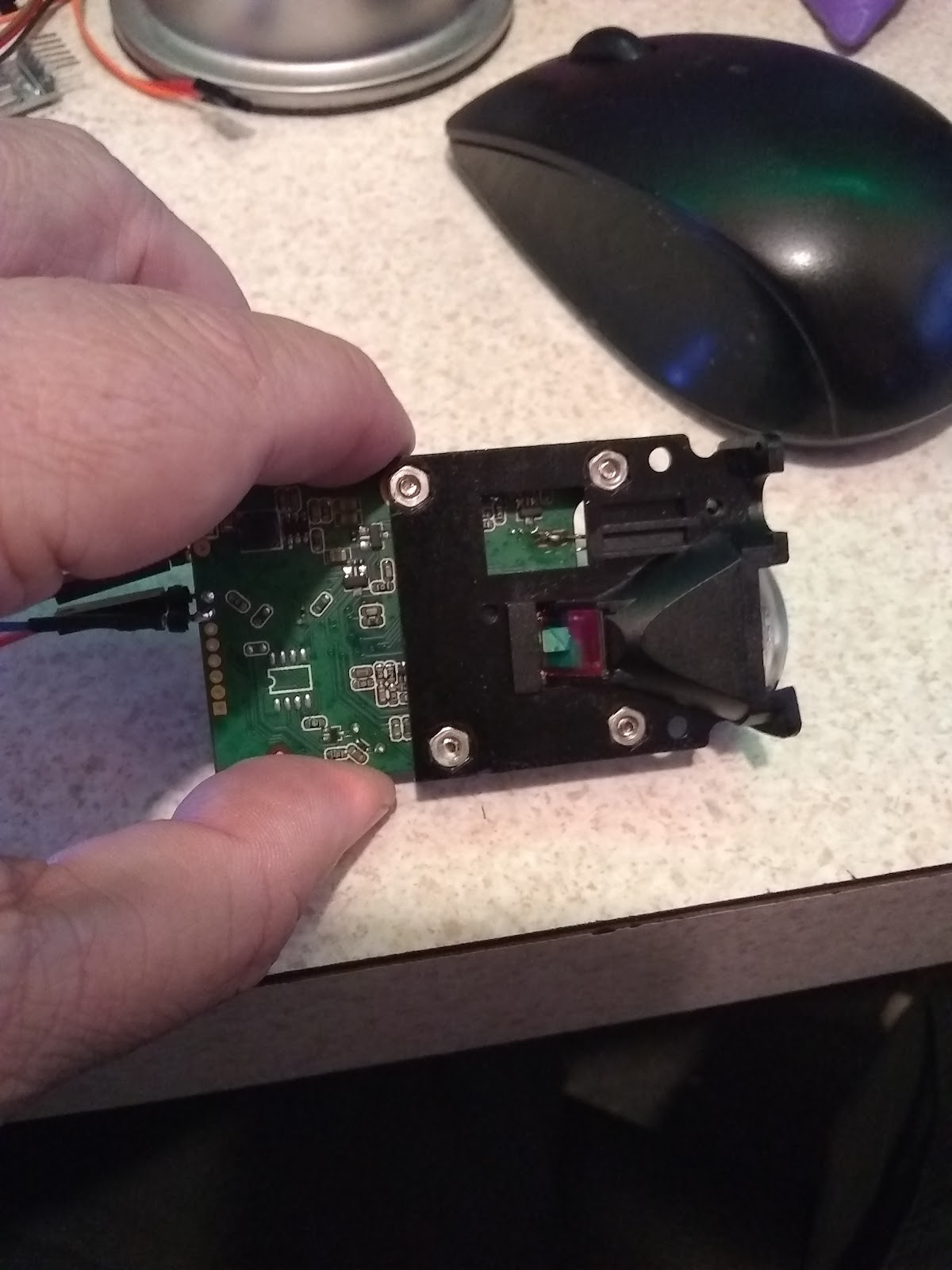
A 100 meter lidar (?) Maybe not.....

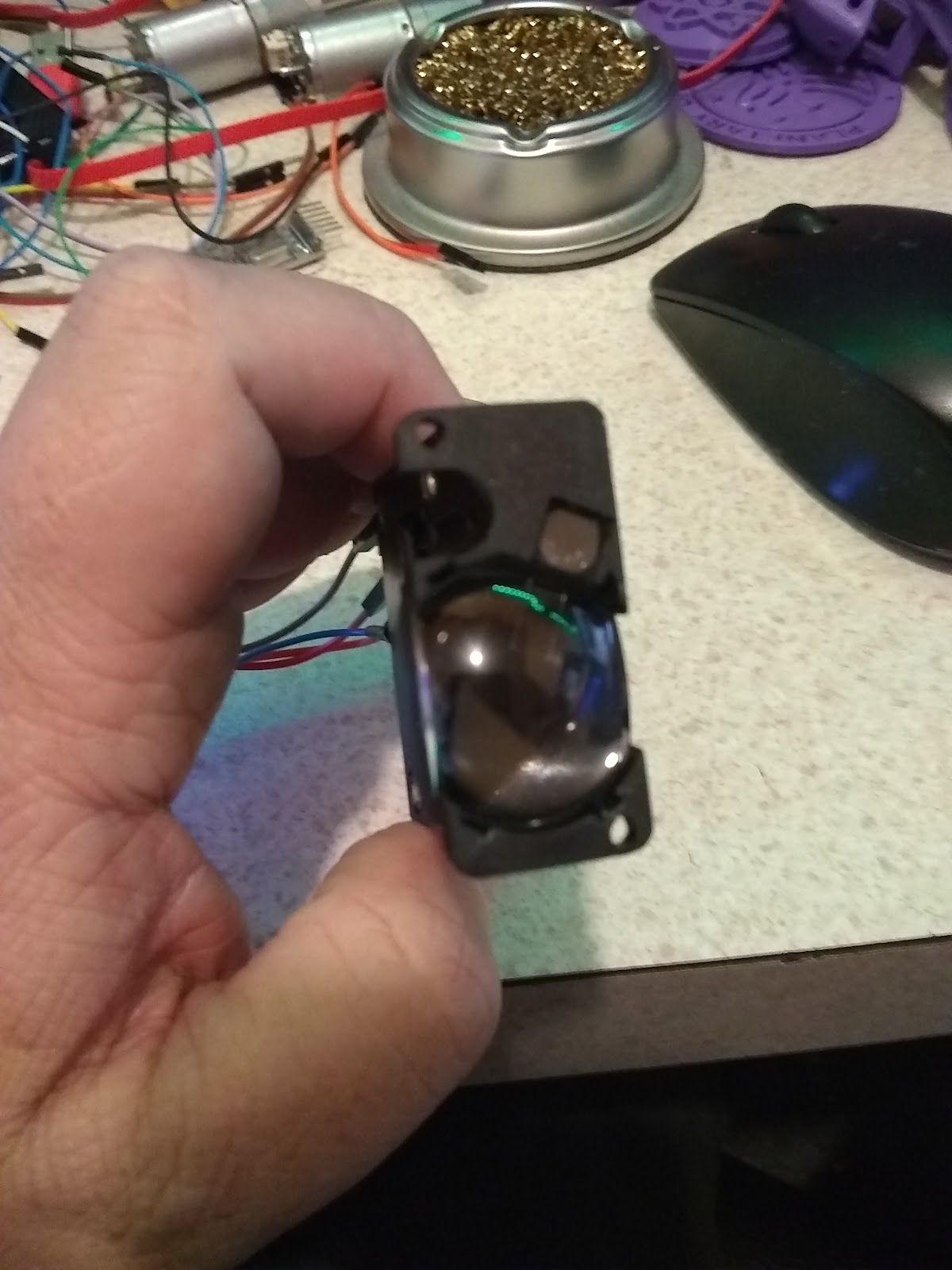
100 Meter LiDAR Range Sensor
Found this unit on Aliexpress, for around $32 dollars, it was probably used as an electronic tape measure. The thing that peaked my interesting was the 100 meter range (328 feet or so). It is easy to use, and seems to work well, but so far I've not gotten anywhere close to the 328 feet. (32.8 feet is about the best I've seen so far)
Could this be a miss print on the listing, or could I just be using this wrong (?) ......
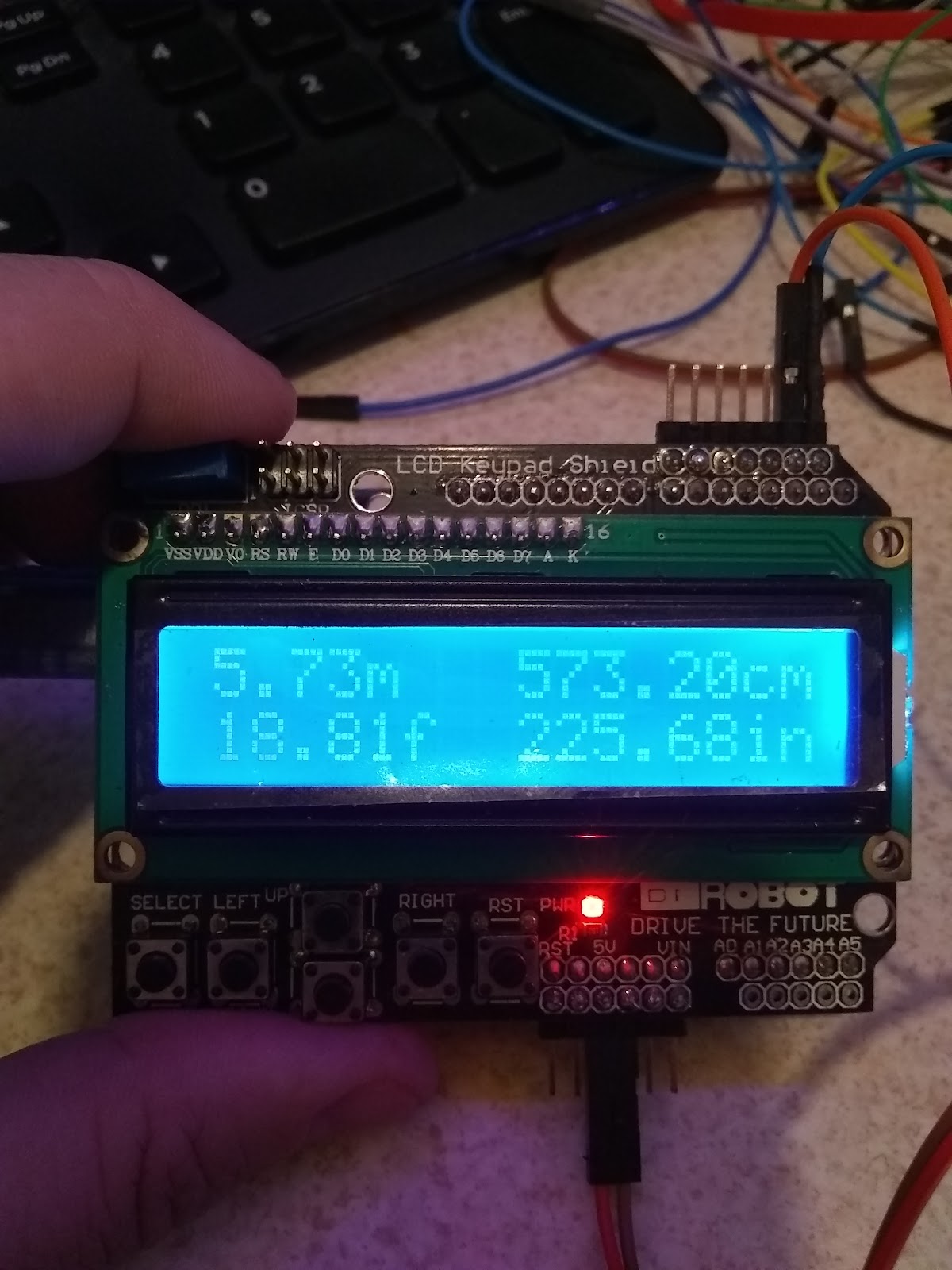
Well either way, I've set this up to work with an Arduino Uno - so far I'm just displaying the distance on a DF Robot 1602 LCD/w buttons.
Laser Type: 635nm, 1 mw (red)
Range: 0.02 to 100 meters
Typical accuracy: +/- 2mm (0 to 40, indoor 20 meters white walls; through correction can be up to +/- 1.5mm)

The laser can be turned on or off (assuming for aiming reasons), reads can be “automatic”, fast (less accuracy), and slow (more accuracy) - “automatic” appears to be about medium speed.
The laser can also display it’s temperature and voltage levels. The output of the sensor is in the format of a String, a typical reading may look something like this:
“12.345m,0079” which tells the distance, and signal quality.  Signal quality a lower number is better. This is good for display, and easy to use for display, but it’s a problem if we need to compare the numbers, or if we are using this on a robot and need the robot to stop at a distance.
Luckily - there is a way to remove the unwanted information from a string, and turn that string into a float - it’s not pretty, and a lot of code to do it, but it can be done.
In my demo, I’ve converted the distance from meters to feet to cm to inches. I’ve dropped the signal quality - but it can be pulled out and used as well.
The demo, will display if the laser is on, or off, the temperature and voltages (default temperature is Celsius, and I convert it to Fahrenheit), formatted for the display I am using.
I’ve setup 5 buttons, one for normal reading, one for fast, one for slow - one will toggle the laser on or off, and one will display voltage, temperature.
An expanded demo would be to use this on a robot for distance/obstacle avoidance.
(under my less than scientific tests, I’ve only been able to get a reading of 32.x feet or about 10 meters - anything greater than 32 feet gives either a reading that is just wrong, or an error. Is it possible that I have a bad unit, or that it really is 10 meters not 100 meters (which would mean it was listed wrong to start with)? )